

Add-ons Overview
Add-ons are optional modules you can add to your Fuze Store subscription. Each one unlocks a capability — customer displays, kitchen tickets, inventory, SMS, and more — on top of your plan.
Most add-ons are per store (you pay once for each store where you enable them). Organization is per account.
Add-ons during Early Release
Add-on purchases are paused during Early Release — you will not be charged. On Add-ons, paid Activate buttons are replaced with a Free during Early Release note (web) or Add-ons are free during Early Release — no purchase needed (app). Trial-granted and Early-Release-unlocked modules still work without a purchase.
What this covers
- You need a default payment method on file before a paid add-on can activate (any plan, including Basic).
- Activation charges a prorated stub for the rest of your current plan period — it does not wait for the next renewal.
- Renewals fold into your plan invoice. Active add-ons align to your plan cycle; they do not renew on a separate clock from their activation date.
- Per-store add-ons bill once per store enable (not one shared charge across every location).
- SMS still uses a prepaid wallet for message usage; the SMS add-on is what unlocks sending.
- No plan includes add-ons. Every add-on is bought separately, on every plan, Premium included.
Paid plans and add-ons are offered for stores in the Philippines. A store in another country can use its free trial and the free Basic plan; the plan and add-on screens show that paid plans aren’t available there yet.
Free during your trial
While you are on an active free trial, every paid add-on is included free except Advanced Inventory. Catalog cards show Included free during trial. When the trial ends, those modules re-lock automatically. Your data is kept — features hide, they are not deleted.
On the web
Browse and activate
- Sign in and open Add-ons in the account sidebar (
/account/addons). - Review Active Add-ons and Available Add-ons.
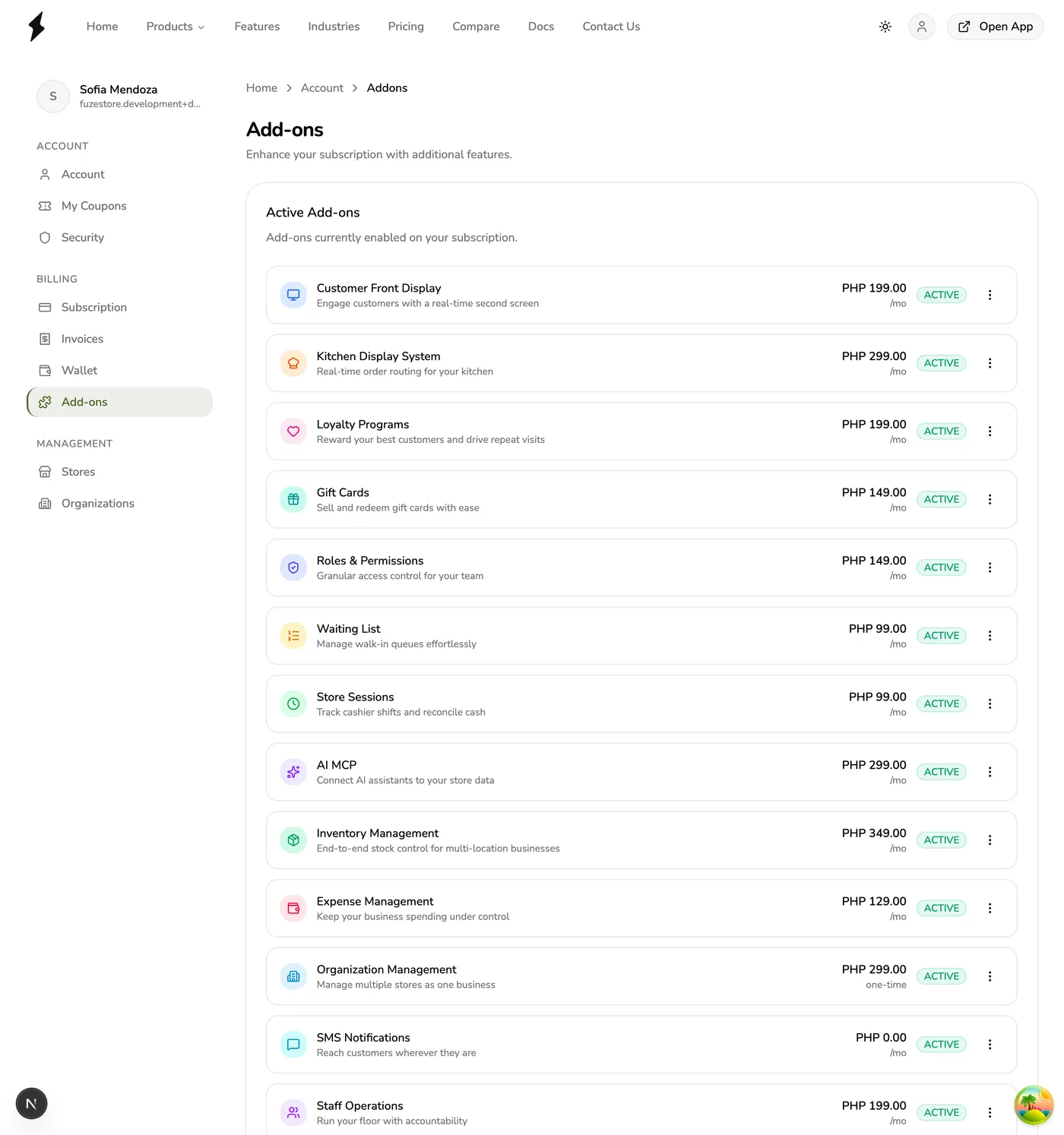
- On a catalog card, use Learn More for the marketing page, or Activate when purchase is available (after Early Release).
- Confirm with Activate in the dialog. When billing is live, the charge is the prorated stub for the rest of your current plan period (renewals then follow your plan cycle).
Cancel or reactivate (account level)
- On an active row, open the ⋯ menu.
The row actions menu on an active add-on, showing How to Use and Cancel — screenshot coming soon
- Select Cancel to stop the add-on renewing, or Reactivate if it was canceled or scheduled for cancellation.
- Use How to Use for a short in-app guide.
What Cancel does:
- Add-ons enabled per store. The add-on is switched off in every store that uses it. Each store keeps it until the end of the period you already paid for, then it turns off. It is left off your next renewal invoice. Nothing is refunded.
- Reactivate before that date and those stores get the add-on back at no charge. A store whose paid period has ended stays off; enable it again on that store.
- Organization is paid monthly for the whole account. Cancel stops the next charge; your organizations keep working until the end of the month you already paid for, then pause.
Enable on a store (per-store add-ons)
- Open Stores → select the store (
/account/stores/{id}). - In the Add-ons card, select Enable for each location that should use the module (confirm Enable for this store).
- To stop using it on that store only, use Disable for this store. The add-on stops renewing and keeps working for that store until the end of the period you already paid for, then turns off. If you enable it again before that date you are not charged; after it, you pay for the days left until your next billing date.
In the app
Browse and activate
- Open the main menu → Account → Add-ons (
/account/addons). - Open an add-on for details (
/account/addons/{id}). - When purchase is available (after Early Release), use the get / activate CTA (often Get —
{{price}}or Activate Addon). Confirm when prompted. - If you are still on free trial with no live plan cycle, paid activation may send you to Change Plan instead of charging (the API requires a plan cycle to prorate).
Enable on a store (per-store add-ons)
- From the add-on detail screen, use the Stores list and tap Enable (or Reenable) for each location.
- Or open the store (
/stores/{storeId}) and manage add-ons from the store details Add-ons section. - Labels use Enable / Disable (and Upgrade plan when activation is blocked).
Available add-ons
- Customer Facing Display (CFD) — Second screen for order details and QR payment codes. Per store.
- Kitchen Display System (KDS) — Kitchen tickets and prep flow. Per store.
- Staff Operations — PIN sessions, manager approvals, terminal pairing, and staff activity audit. Per store.
- Loyalty — Points and tier rewards. Per store.
- Gift Cards — Sell and redeem digital gift cards. Per store.
- Roles & Permissions — Custom staff roles and granular access. Per store.
- Waiting List — Walk-in queues and call notifications. Per store.
- Store Sessions — Cashier shifts and end-of-day reconciliation. Per store.
- AI Connections — Connect AI assistants to query store data. Per store.
- Advanced Printing — Label / sticker printing beyond basic receipts. Per store.
- Floor Plan — Visual floor editor and live floor on the register. Per store. See Floor Plan Overview.
- Advanced Inventory — Multi-location stock, POs, transfers, counts. Per store. Not free on trial.
- Expense Management — Track and approve expenses. Per store.
- Text Messaging (SMS) — Transactional SMS; prepaid wallet for usage. Per store.
- Organization — Group your stores as branches, with members and branch access, people who work across branches, and pay runs. One monthly fee per account, however many stores you group; each store keeps its own plan. Included in your free trial. See Organizations Overview.
Public marketing catalog: Browse add-ons.
Tips
- Enable only the stores that need a per-store module so you do not pay for unused locations once billing is live.
- Keep a default payment method ready before GA so activate and renewals can charge.
- Advanced Inventory stays purchase-gated even during the free trial.
Works with
| Add-on or plan | What changes on this page |
|---|---|
| Store owner | Plans, add-ons and cards belong to the account of the store's owner. Only the owner (or, for an organization, its owner) can change a plan or an add-on. |
| Free trial | During a store's free trial most add-ons work for free and no card is asked for. Inventory and NFC are the exceptions. |
| Early release | While payments are paused the card section, coupon card, Cancel and recent invoices on Subscription are hidden, and the trial reads as free with no end date. This page describes how it works once billing is live. |
| Organization add-on | Billed per account, not per store. |
| SMS add-on | Free to turn on; texts are paid from the wallet. |