

How to Assign a Role to Staff
Assigning the right role to each staff member controls what they can see and do in your POS system. Roles help keep your business secure and running smoothly.
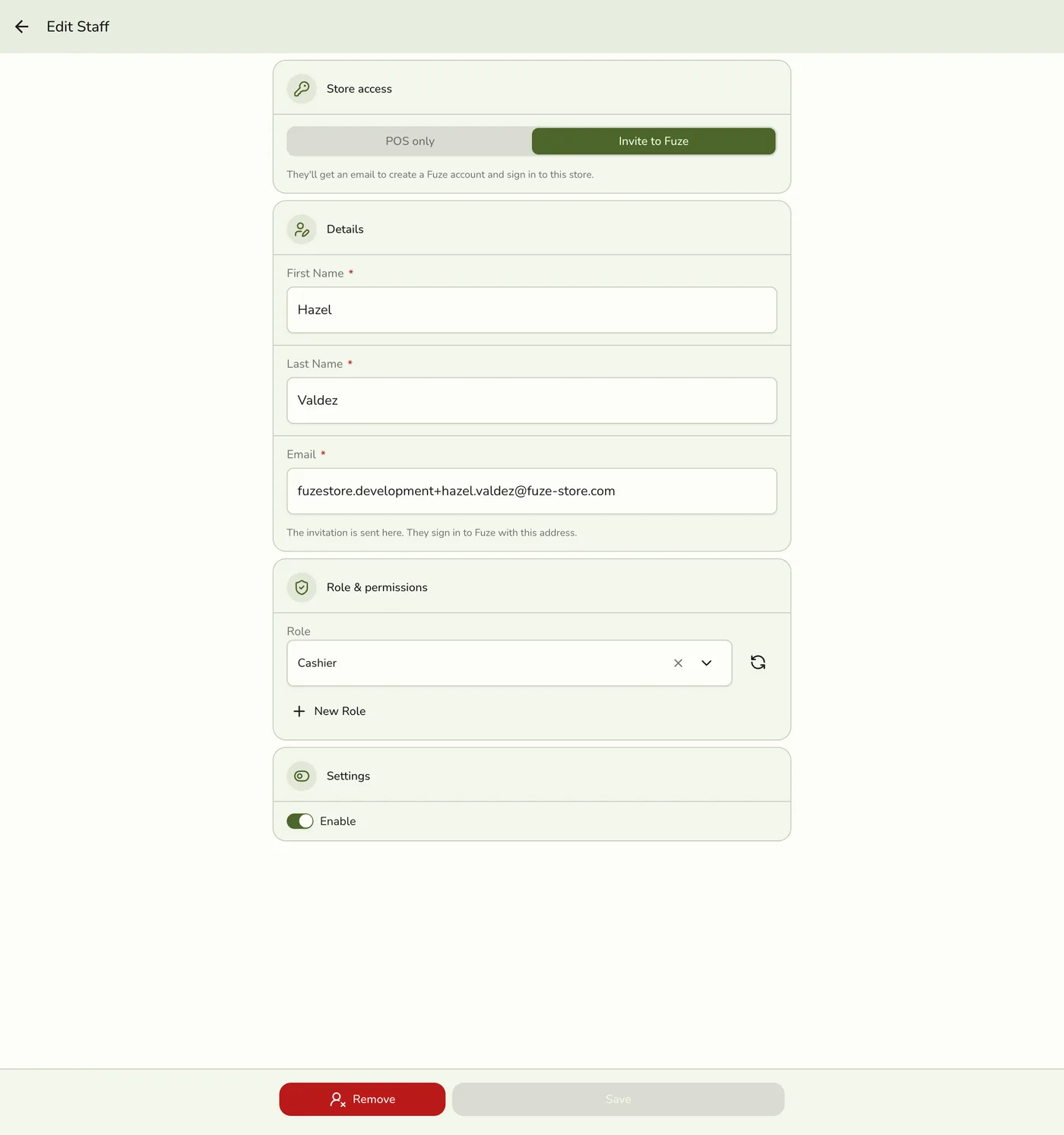
How to Assign a Role
You assign a role when adding or updating a staff member. Open the staff member's edit form (Staff list → the ⋮ actions icon on their row → Edit), choose the appropriate role from the Role dropdown, and save your changes.
For the full walkthrough, see How to Update Staff.
Which Roles You Can Assign
The dropdown lists only the roles you are allowed to give away. You can assign a role when everything it unlocks is something you can already do yourself.
That means a manager who cannot edit roles or view reports will not see roles that grant those permissions. It is not a bug — it stops someone from handing out more access than they hold.
Store owners and organization owners or admins can assign every role.
If the role you need is missing from the list, ask the store owner to assign it, or ask them to grant you the matching permissions first.
Creating a Role While Assigning
If no existing role fits, tap New role below the dropdown to create one, then come back and assign it. The button only appears if you have permission to create roles.
Editing Staff Who Outrank You
You can still update the name, email, or status of a staff member whose role is broader than yours. The restriction applies only to changing someone's role, not to editing their other details.
To learn more about what each role can do, see Roles and Permissions Overview.